If you searched for a retouch app free option, TouchRetouch is the official ADVA Soft photo editor built for one clear job: removing unwanted objects and distractions from photos on mobile. It helps clean up travel shots, family pictures, social posts, and property images on iPhone, iPad, and Android.
Rather than trying to be an all-in-one desktop-style editor, TouchRetouch focuses on practical photo cleanup tools that are easy to use on a phone or tablet. It edits photos only and does not support video editing.
What TouchRetouch is and who it’s for
If you searched re touch, this is the official app name
If you typed re touch into Google, the official product name is TouchRetouch. It is developed by ADVA Soft GmbH in Berlin, Germany, and it is designed specifically for mobile photo retouching and object removal.
What TouchRetouch helps you do on mobile
TouchRetouch is a specialist photo cleanup app for iOS and Android, not a broad desktop editor. Its main purpose is to help you remove photobombers, signs, wires, fences, blemishes, and other distractions from still images while keeping the editing process simple on a touchscreen.
That focus is why broad searches for retouch tools often lead here. The app is especially useful when you want a cleaner final image without spending time learning layers or complex desktop workflows. Apple has also selected TouchRetouch as an Editors’ Choice app on the App Store.
Who benefits most from this photo cleanup app
This editor fits travelers removing crowds from landmarks, parents cleaning up family photos, creators polishing social content, and real estate professionals improving property shots. As of the time of writing, TouchRetouch also has an approximate 4.7-star average rating across the App Store and Google Play, though current ratings should always be verified before publishing.
For more practical cleanup ideas, see how to remove objects from photos on iPhone and Android.
Why this retouch app free download stands out
Free to download, with premium AI tools available by subscription
TouchRetouch is free to download; premium AI features require a paid subscription. Check the App Store or Google Play for current pricing, which varies by region. That gives users an easy way to install the official app and decide whether its workflow matches their editing needs.
What you can use it for before choosing a plan
TouchRetouch stands out because it is built around dedicated cleanup tools instead of broad, general editing panels. You can explore an interface centered on removing objects, lines, meshes, and people, which makes the app especially relevant for commercial-intent searches around photo retouching.
Why broad retouch searches often lead to TouchRetouch
Many users looking for a retouch app free download are really trying to solve one problem: distractions in a photo. TouchRetouch addresses that directly with purpose-built tools and a clean mobile workflow. Family Sharing is also supported on iOS.
Download TouchRetouch for free on iOS and start removing unwanted objects today. Download TouchRetouch for free on Android and start removing unwanted objects today.What you can do with TouchRetouch
Remove Objects for everyday distractions
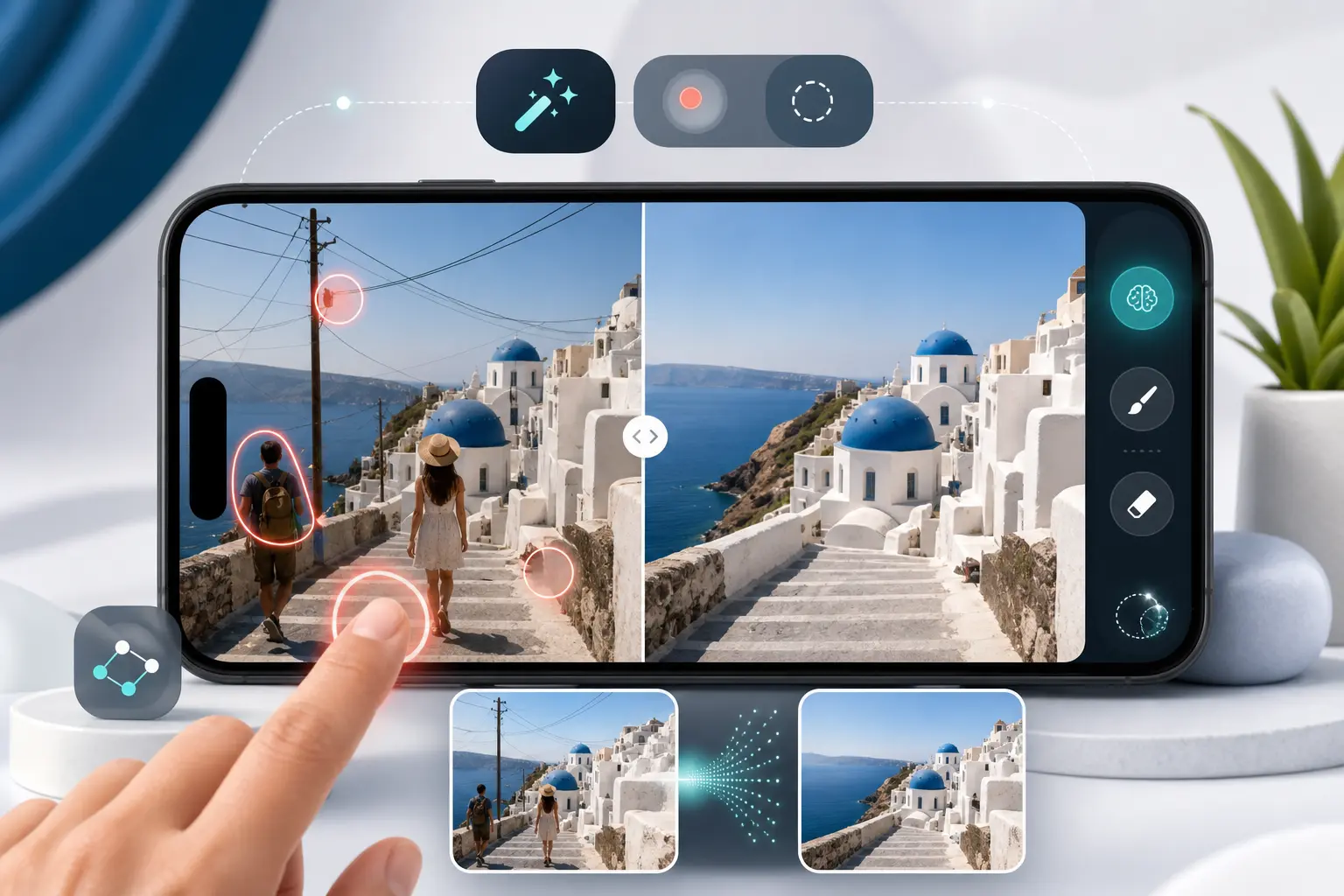
Remove Objects is the core feature. Use the Brush tool to paint over a distraction such as a trash can, logo, blemish, or passerby, or use Lasso when you want to outline an object more precisely. Adjustable brush settings help with detail work, and Restore lets you bring back small areas if your selection goes too far.
The app uses edge-aware processing designed to help edits blend naturally into the surrounding image. In a beach photo, for example, it can help remove footprints or a cooler from the sand; in a street shot, it can help erase a sign or parked scooter that pulls attention away from the subject.
Erase AI for automatic cleanup
Erase AI is the app’s intelligent cleanup option for common distractions. This retouch ai feature can detect background people and objects such as street signs, trash cans, stop lights, and shadows while preserving the main subject.
That makes it useful for busy tourist spots, city scenes, and outdoor portraits where the background has random clutter. Premium AI features include Erase AI, Blur, Backgrounds, Smart Scenes, FaceRetouch, and Person Removal.
Person Removal for group and travel photos
Person Removal is designed for photos with multiple people in the frame. It can detect all people in a group shot, let you choose which individuals to remove, and then fill the empty areas while adjusting the remaining composition naturally.
Think of a family photo where one extra person walked into the edge of the frame, or a travel image where strangers distract from the landmark. This is one of the clearest examples of how TouchRetouch approaches cleanup differently from a general editor.
Line Removal and Mesh Removal for wires and fences
Line Removal targets power lines, cables, and other long linear distractions. You can tap or mark part of a wire, and the app detects the full line automatically. For curved segments, manual control points give you more precision.
Mesh Removal is built for foreground fences and similar patterns. The workflow is simple: choose the tool, tap Go, and let the app handle detection and removal. This is especially helpful for zoo photos, sports shots taken through fencing, or property images with chain-link barriers in front.
Clone Stamp and Blur for precise finishing touches
When an automatic edit needs refinement, Clone Stamp gives you a manual repair option. You copy texture from one area to another, which is useful for complex backgrounds like brick walls, patterned clothing, or detailed foliage.
Blur adds selective blur to chosen parts of a photo for privacy, focus, or a softer depth effect. Results depend on scene complexity, and heavily textured backgrounds may need Clone Stamp refinement after automatic removal. If you also want to remove glare from glasses in a photo, ADVA Soft offers guidance for that use case too.
AI editing tools beyond object removal
Backgrounds for background removal and replacement
Backgrounds automatically removes the background from a photo and lets you replace it with a built-in preset or your own image. It also supports background blur, which is useful when you want a portrait or product photo to feel cleaner and more focused.
Smart Scenes for one-tap scene transformations
Smart Scenes is an ai photo editor feature that transforms an existing image into a different look with one tap. It does not generate images from scratch or use text prompts. Instead, it changes the appearance of the current photo, including hairstyles, backgrounds, and the overall scene style.
Natural FaceRetouch for subtle portrait enhancement
Natural FaceRetouch is designed for subtle, natural-looking portrait edits. It can smooth skin, brighten eyes, enhance a smile, reduce wrinkles on the face and neck, even skin tone, and add eye highlighting while preserving natural facial features rather than creating an artificial look.
These tools are meant to enhance a real photo, not replace it with something unrecognizable. If you want to add shadow to an image for a more polished look, that can also complement a cleaner retouched result.
Supported devices, export quality, and important limits
Where TouchRetouch works
TouchRetouch is available on iPhone, iPad, and iPod touch with iOS 14.0 or later, plus Mac with Apple M1 or later via macOS 11.0 or later, Apple Vision via visionOS 1.0 or later, and Android through Google Play. For many users searching for a photo editing app android option with strong cleanup tools, that cross-platform support is a major advantage.
What to expect on iPhone, iPad, Android, and Apple devices
The app is mobile-only, with no standalone desktop version. It includes in-app tutorials and a clean interface, and exports preserve photo quality and EXIF data, which is useful when you want to keep image details intact after editing.
Limits to know before you download
TouchRetouch edits photos only and does not edit video. Some AI-powered features require an internet connection, and results depend on photo resolution and scene complexity. It is a powerful mobile editor, but it is not positioned as a desktop replacement.
Why choose TouchRetouch when you search retouch app free
What makes it different from generic retouch tools
TouchRetouch stands out because it specializes in object removal. Along with Apple Editors’ Choice recognition, it offers dedicated tools for lines, meshes, and Person Removal, plus Natural FaceRetouch and Smart Scenes for broader AI-powered photo improvements.
Pros and trade-offs for comparison-minded users
Pros include a focused cleanup workflow, natural-looking portrait retouching, background replacement, preserved photo quality and EXIF data, and availability on iOS and Android. Trade-offs include photo-only editing, subscription-based premium AI tools, internet requirements for some AI features, and the need for manual Clone Stamp refinement in more complex scenes.
Official download options for iOS and Android
If you want the official app, use the official TouchRetouch app page or the store listings below. Get TouchRetouch on the App Store / Google Play.
Frequently Asked Questions
Is TouchRetouch really free to download?
Yes. TouchRetouch is free to download; premium AI features require a paid subscription. Check the App Store or Google Play for current pricing, which varies by region. That means you can install the app first and review whether its tools fit your photo editing needs.
I searched re touch — is TouchRetouch the official app name?
Yes. If you searched re touch, the official app name is TouchRetouch. It is developed by ADVA Soft GmbH in Berlin, Germany.
Does TouchRetouch use AI to remove people and objects from photos?
Yes. TouchRetouch includes AI-powered tools such as Erase AI and Person Removal to detect and remove background people and common distractions from photos. It also offers AI-powered Backgrounds, Smart Scenes, and Natural FaceRetouch for additional edits.
Can TouchRetouch edit videos or only photos?
TouchRetouch edits photos only. It does not support video editing, so it is best suited for still-image cleanup and retouching on mobile devices.
Which devices support TouchRetouch on iOS and Android?
TouchRetouch supports iPhone, iPad, and iPod touch with iOS 14.0 or later, Mac with Apple M1 or later via macOS 11.0 or later, Apple Vision via visionOS 1.0 or later, and Android devices through Google Play. Some AI features also require an internet connection.
For users comparing options, the main appeal is simple: TouchRetouch is built to remove distractions from photos without turning mobile editing into a complicated project. It focuses on the tasks people search for most often, from erasing photobombers to cleaning up wires, fences, blemishes, and background clutter.
If you want a retouch app free to download and evaluate on your phone, TouchRetouch is the official ADVA Soft choice for iOS and Android. Download TouchRetouch for free on iOS and Android and start removing unwanted objects today.
FAQ
What is TouchRetouch used for?
TouchRetouch is used to remove unwanted objects, lines, blemishes, and other distractions from photos on mobile devices.
Is TouchRetouch a retouch app free option?
If you are searching for a retouch app free solution, TouchRetouch is the official ADVA Soft app designed specifically for quick and precise object removal.
How does re touch work in TouchRetouch?
The re touch process works by letting you brush, lasso, or tap unwanted elements so the app can intelligently blend the area with the surrounding background.
Does TouchRetouch include retouch ai features?
Yes, TouchRetouch uses smart retouch ai-assisted tools to detect distractions and help create natural-looking edits with minimal effort.
Who should use TouchRetouch?
TouchRetouch is ideal for travelers, creators, online sellers, and anyone who wants cleaner photos without using complex desktop editing software.