-
Subscription & payments
- 1. How do I cancel my subscription and request a refund?
- 2. I already purchased a lifetime license — why am I prompted to subscribe?
- 3. Is there a lifetime license available?
- 4. Why can’t I save photos even though I purchased the app?
- 5. Why was I charged after the free trial?
- 6. Why was I still charged after canceling my subscription?
- 7. Why are there different plans and prices for the app on the App Store?
- 8. How do I restore my purchase?
- 9. Can I share my TouchRetouch subscription with Family Sharing?
- 10. Can I use TouchRetouch on multiple devices?
- Editing & features
- Troubleshooting & recent issues
- TouchRetouch as a Photos Extension
- Managing storage & edited photos
- Privacy & data
- Beta testing for ADVA Soft
Subscription & payments
How do I cancel my subscription and request a refund?
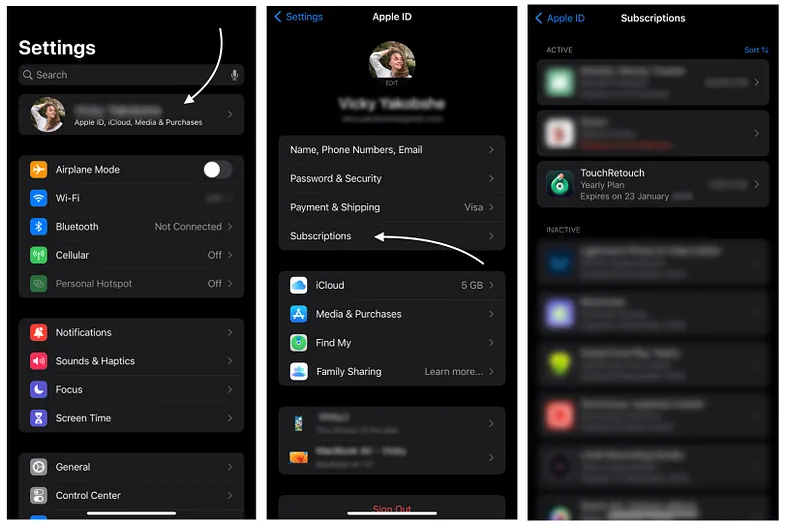
To cancel your subscription:
- Open the Settings app, tap your name at the top, then select Subscriptions.
- Find TouchRetouch, then tap Cancel Subscription.
ℹ️ Note: Refunds are processed directly by Apple. To request a refund, visit Apple’s support page.
Cancel subscription
I already purchased a lifetime license — why am I prompted to subscribe?
We’ve switched to a subscription model to keep enhancing TouchRetouch and bringing even more value to our users. However, as a previous purchaser, you can contimue to use all the tools you paid for under the Retouch Core plan at no additional cost, including updates and improvements to them.
ℹ️ Note: If your plan shows Retouch Free instead of Retouch Core, try restoring your purchase: open TouchRetouch, go to Settings, and tap Restore Subscription. If that doesn’t work, reinstall the app and try restoring again.
Is there a lifetime license available?
We no longer offer a lifetime license. The app is available via subscription, which includes regular updates and new features.
Why can’t I save photos even though I purchased the app?
Since you bought the app as a one-time purchase, you’re automatically on the Retouch Core plan and still have full access to all the features you originally paid for, including exporting.
If you see a subscription prompt when saving, it means you’ve used a premium feature (Blur, Erase AI, Backgrounds, Person Removal, PRO AI model, etc.) that requires a premium plan to export. To save your photo for free, undo the premium edits.
Why was I charged after the free trial?
Your free trial will automatically convert to a paid subscription unless canceled in advance. To avoid being charged, please cancel at least 24 hours before the trial ends.
ℹ️ Note: If you believe you were charged by mistake and didn’t miss the trial deadline, you can request a refund here.
Why was I still charged after canceling my subscription?
If you cancel your subscription less than 24 hours before the trial ends, you may still be charged, as Apple processes renewals within that timeframe.
ℹ️ Note: To request a refund, visit Apple’s support page.
Why are there different plans and prices for the app on the App Store?
All our plans offer full access to the app, with differences in subscription duration and pricing based on location and user group.
Additionally, our Yearly Plan includes a 3-day trial, while the Weekly, Monthly, and Yearly Plus plans do not.
Check available plans and pricing in the TouchRetouch app’s Settings.
How do I restore my purchase?
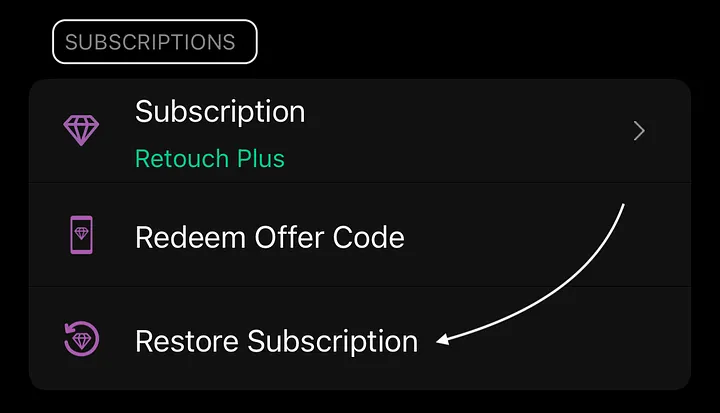
If you’re using the same platform (iOS) and the same Apple ID, open TouchRetouch, go to Settings, and select Restore Subscription.
If you’ve switched to a different platform (e.g., from Android to iOS) or changed your Apple ID, restoring the purchase isn’t possible.
Restore subscription
Can I share my TouchRetouch subscription with Family Sharing?
Yes, you can. To enable Family Sharing:
- Open the Settings app and tap your name.
- Go to Subscriptions and select TouchRetouch.
- Turn on Share with Family.
Ensure Family Sharing is set up on your Apple ID for this option to work.
Can I use TouchRetouch on multiple devices?
Yes. As long as you’re using the same Apple ID and operating system, you can use your subscription on multiple devices. To activate it, open TouchRetouch, go to Settings, and tap Restore Subscription.
💡 Tip: You can also use your iOS subscription on a Mac with an Apple Silicon chip. Search for TouchRetouch in the Mac App Store, choose iPhone & iPad Apps, and tap Install.