
Troubleshooting & recent issues
Why is the app running slowly?
TouchRetouch uses advanced AI and machine learning for more precise retouching. On older devices, this may affect performance due to higher storage and processing demands.
To improve speed:
- Close other apps running in the background.
- Free up storage if your device is low on memory.
- Ensure your app is up to date — we regularly optimize performance.
You can also clear session files by tapping Discard Changes at the bottom of the gallery screen.
⚠️ Note: Save your work first to avoid losing any edits.
My edits or results don’t look as expected — how can I fix this?
Our AI algorithm isn’t perfect yet and may struggle with complex images.
To get the best results, try these tips:
- Refine your selection or use Erase AI in Auto mode.
- Toggle the People-Aware Algorithm on or off in Objects > Settings to see what works best.
- Zoom in for greater precision or use a smaller brush size.
- Use the Clone Stamp tool to manually fix any distortions.
📩 Note: We’re constantly improving our AI. If something doesn’t look right, please send a screenshot of your result along with the original photo to [email protected] so we can investigate.
The app crashes, glitches, freezes, or lags — what should I do?
To help us resolve this issue, please email us with the following details:
- Crash report: Go to Settings > Privacy & Security > Analytics & Improvements > Analytics Data and look for entries related to TouchRetouch.
- Video recording: A short clip showing the issue in action.
- Technical details: Your device model, app version, and Customer ID (found in the app under Settings > Contact Us > Report Problem).
Once we receive this information, we’ll investigate and get back to you as soon as possible.
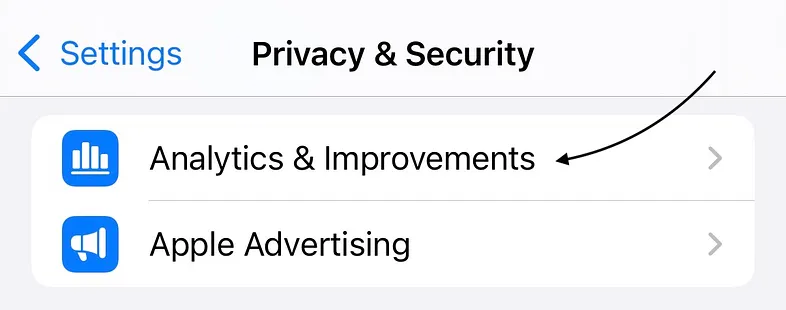
Crash report


